 CHAI is a Biological Operating System for practices advancing healthspan.
See what’s changing, what needs attention, and what to do next—between visits.
One place for patients to log meals, confirm doses, ask CHAI, and message your practice. Each patient’s labs, protocols, wearable data and symptoms connect in one record, so you see the trends and priorities behind your next decision.
Ask a question. See the patient data behind the answer. CHAI connects labs, protocols, symptoms and wearable data, with the supporting results shown alongside its response.
Recorded CHAI response · Synthetic patient
Abbreviated from the recorded answer
Across Michael's last three draws (2025-09-02, 2026-03-17, 2026-08-28), the lipid, glucose, liver and inflammation markers all rose steadily while the sex hormones all fell.
- ApoB 118 → 125 → 132 mg/dL; triglycerides 218 → 238 → 252 mg/dL
- HbA1c 5.8 → 6.1 → 6.3%, inside the prediabetes range
- ALT 52 → 58 → 64 U/L; hs-CRP 2.8 → 3.4 → 3.9 mg/L
- Total testosterone 348 → 312 → 298 ng/dL
Checks it suggests before the next draw: iron studies with ferritin, a CBC so FIB-4 can be calculated, LH, FSH and prolactin, TSH, a urine albumin-to-creatinine ratio, and Lp(a) if it has never been measured. It closes by saying a clinician should review these results before the next scheduled draw.
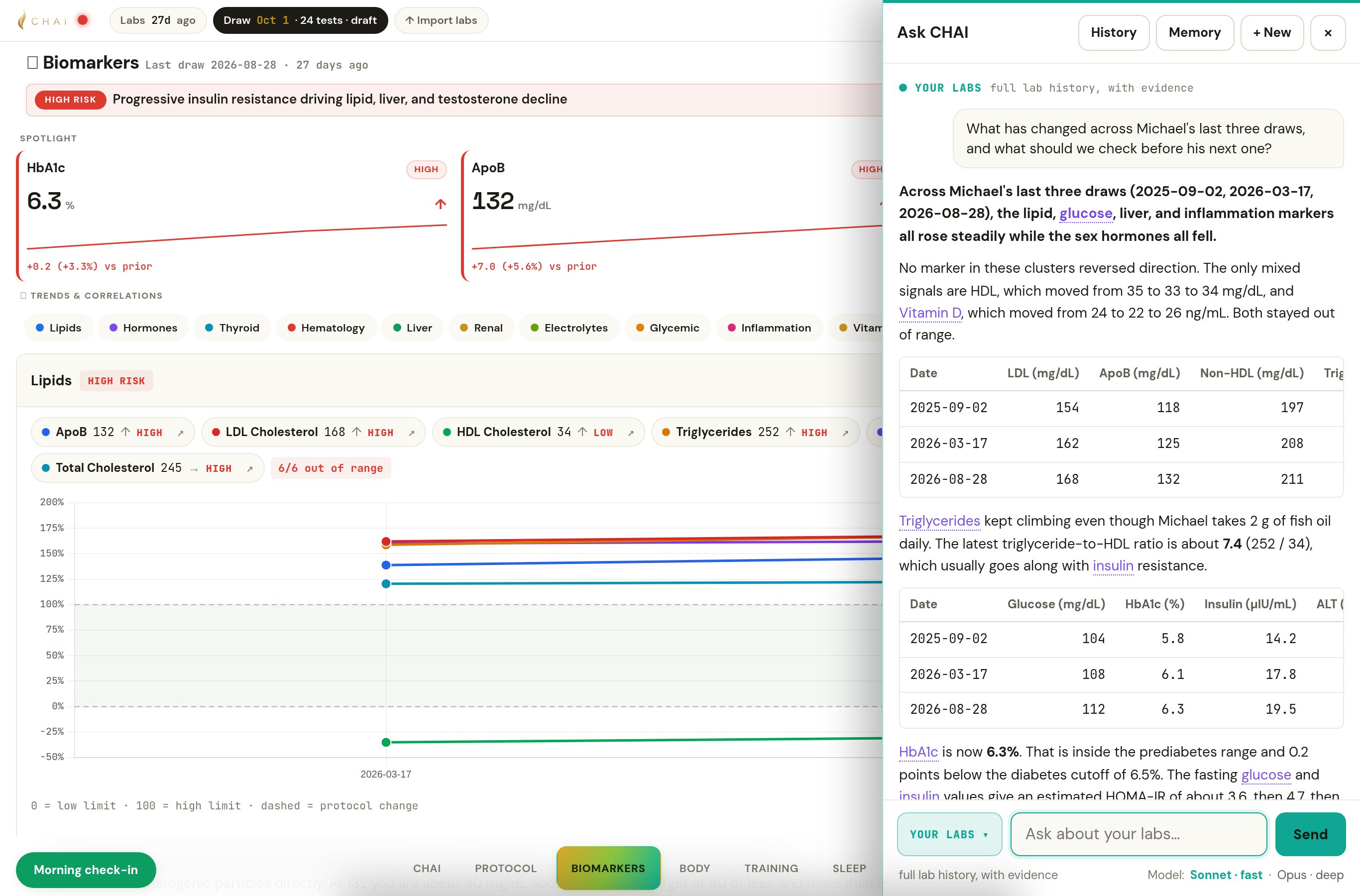
Across Michael's last three draws (2025-09-02, 2026-03-17, 2026-08-28), the lipid, glucose, liver, and inflammation markers all rose steadily while the sex hormones all fell.
No marker in these clusters reversed direction. The only mixed signals are HDL, which moved from 35 to 33 to 34 mg/dL, and Vitamin D, which moved from 24 to 22 to 26 ng/mL. Both stayed out of range.
| Date | LDL (mg/dL) | ApoB (mg/dL) | Non-HDL (mg/dL) | Triglycerides (mg/dL) | HDL (mg/dL) |
|---|---|---|---|---|---|
| 2025-09-02 | 154 | 118 | 197 | 218 | 35 |
| 2026-03-17 | 162 | 125 | 208 | 238 | 33 |
| 2026-08-28 | 168 | 132 | 211 | 252 | 34 |
Triglycerides kept climbing even though Michael takes 2 g of fish oil daily. The latest triglyceride-to-HDL ratio is about 7.4 (252 / 34), which usually goes along with insulin resistance.
| Date | Glucose (mg/dL) | HbA1c (%) | Insulin (µIU/mL) | ALT (U/L) | AST (U/L) | hs-CRP (mg/L) |
|---|---|---|---|---|---|---|
| 2025-09-02 | 104 | 5.8 | 14.2 | 52 | 34 | 2.8 |
| 2026-03-17 | 108 | 6.1 | 17.8 | 58 | 38 | 3.4 |
| 2026-08-28 | 112 | 6.3 | 19.5 | 64 | 42 | 3.9 |
HbA1c is now 6.3%. That is inside the prediabetes range and 0.2 points below the diabetes cutoff of 6.5%. The fasting glucose and insulin values give an estimated HOMA-IR of about 3.6, then 4.7, then 5.4. GGT was only measured twice, but it also rose, from 62 to 71 U/L. Rising ALT, AST, and GGT together with insulin resistance fit a fatty-liver pattern, but these labs can't confirm it.
| Date | Total T (ng/dL) | Free T (pg/mL) | SHBG (nmol/L) | Estradiol (pg/mL) |
|---|---|---|---|---|
| 2025-09-02 | 348 | 7.2 | 48 | 28 |
| 2026-03-17 | 312 | 6.4 | 42 | 22 |
| 2026-08-28 | 298 | 5.8 | 38 | 18 |
LH (3.2 mIU/mL) and FSH (2.8 mIU/mL) were only measured on 2026-03-17. Both are in the low-normal range, which leans toward a secondary (pituitary-side) cause of the falling testosterone rather than a testicular one. However, it's a single draw. The drop in SHBG matches the rising insulin, because insulin resistance lowers SHBG.
Some findings from outside the last three draws are also relevant:
- eGFR fell from 92 to 86 mL/min/1.73m2, and creatinine rose from 1.0 to 1.1 mg/dL (2025-02-07 to 2026-08-28).
- Ferritin was 298 ng/mL on 2025-09-02 and hasn't been rechecked.
- TSH was last measured on 2025-09-02 at 2.4 mIU/L.
- Current diastolic blood pressure is 90.18 mmHg.
Checks for the next draw so results are comparable and the gaps get filled:
- Keep the same conditions: fasting for 10–12 hours, a 7–10 am draw for testosterone, and no hard training or alcohol for 48 hours beforehand.
- Recheck ferritin and add iron, TIBC, and transferrin saturation. High ferritin alongside rising liver enzymes needs an iron-overload screen, and ferritin can also rise with inflammation.
- Add a CBC with platelets so FIB-4 can be calculated, and consider a liver ultrasound or FibroScan.
- Repeat LH and FSH, and add prolactin, to follow up on the falling total and free testosterone.
- Repeat TSH, since the last value is a year old and thyroid function affects both lipids and testosterone.
- Add a urine albumin-to-creatinine ratio, given the eGFR decline and the diastolic blood pressure of 90.
- If Lp(a) has never been measured, add it once, since ApoB is at 132 mg/dL.
- Look beyond the labs as well: alcohol intake, any new medications or supplements, weight trend (only the current 196.62 lb is on file), and sleep apnea screening, which is linked to both low testosterone and metabolic decline.
- Confirm Michael is actually taking the Vitamin D3 2000 IU. Levels are still low at 26 ng/mL, so ask the clinician whether the dose should change.
There are no clinical notes on file, so these results can't be linked to any change in diet, activity, or medication. With HbA1c close to the diabetes threshold and ApoB still rising, a clinician should review these results before the next scheduled draw.
A pattern for the clinician to review, not a diagnosis.
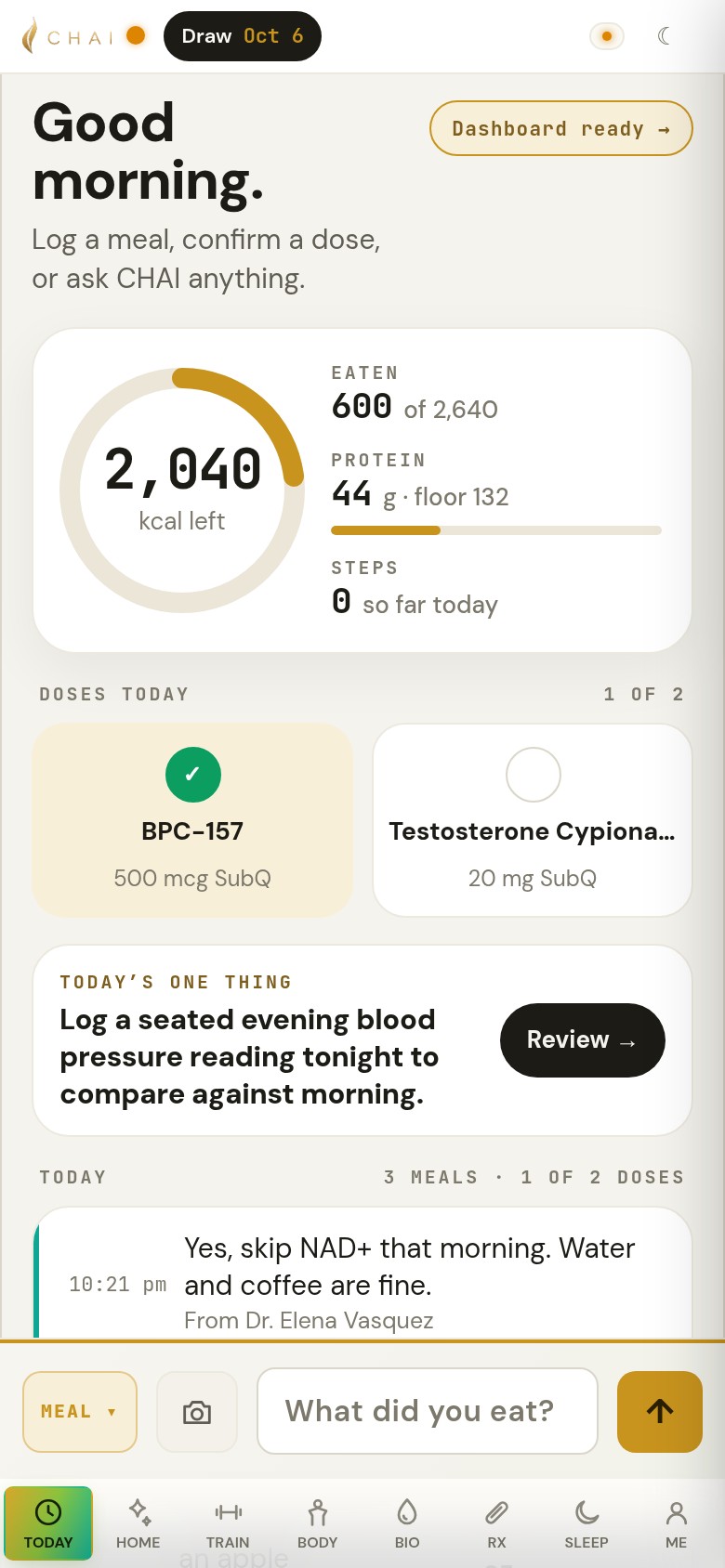
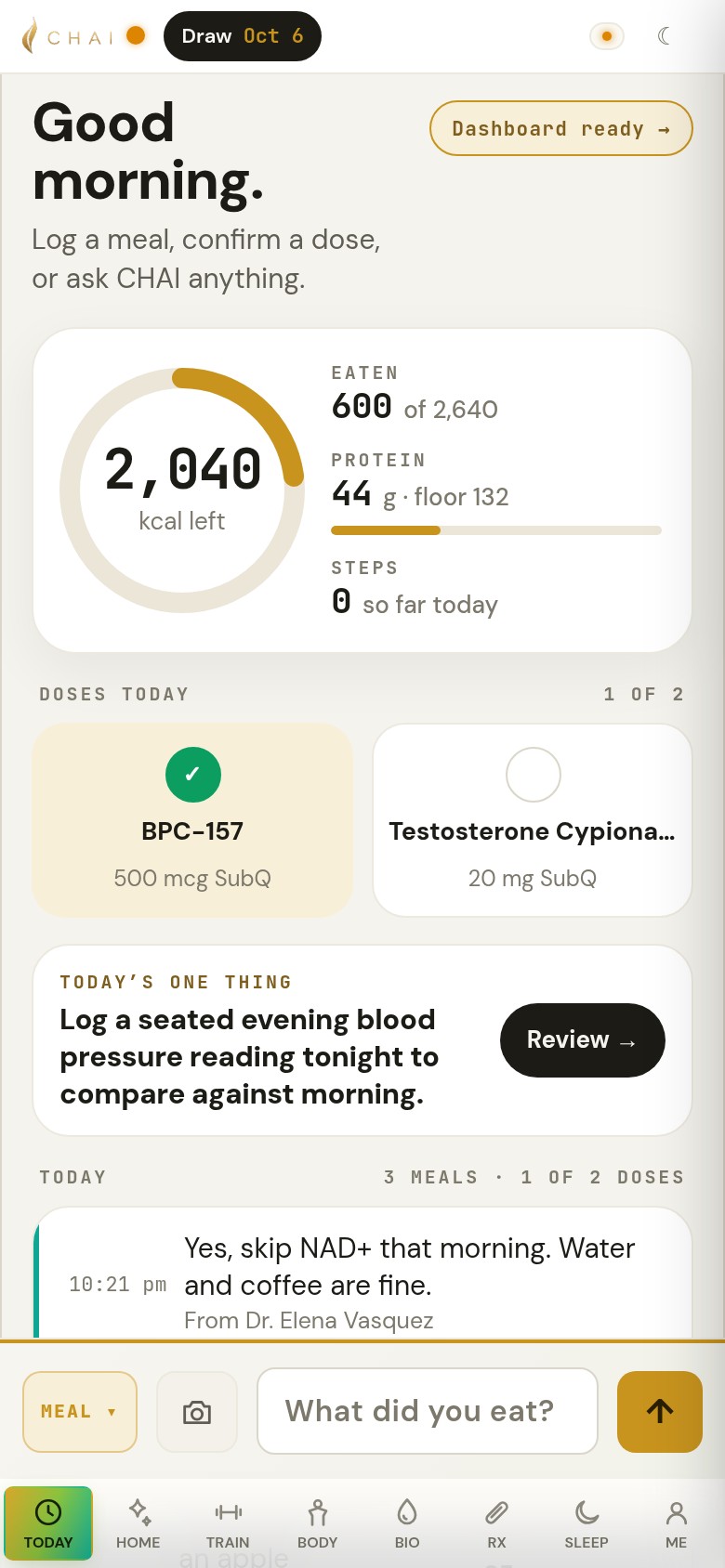
Daily care starts on Today.
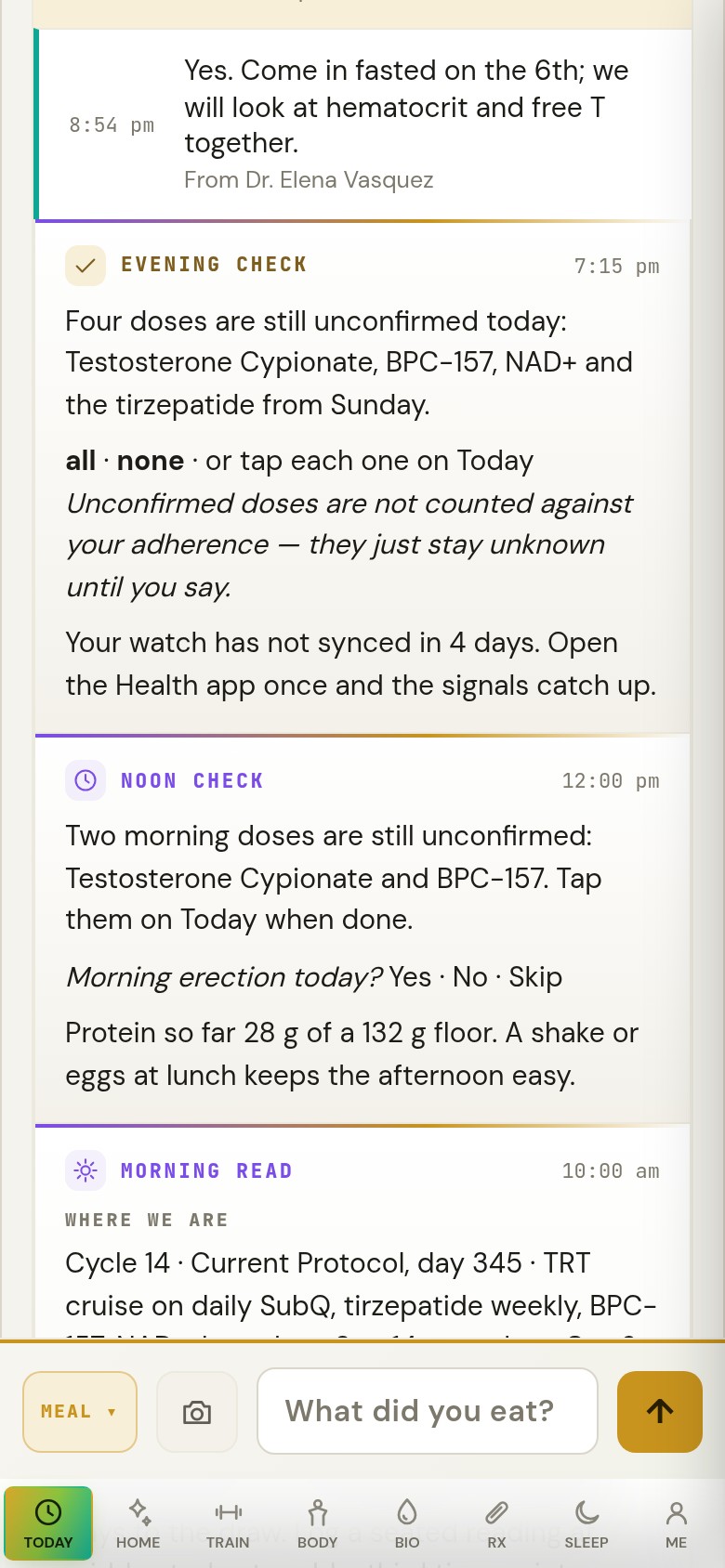
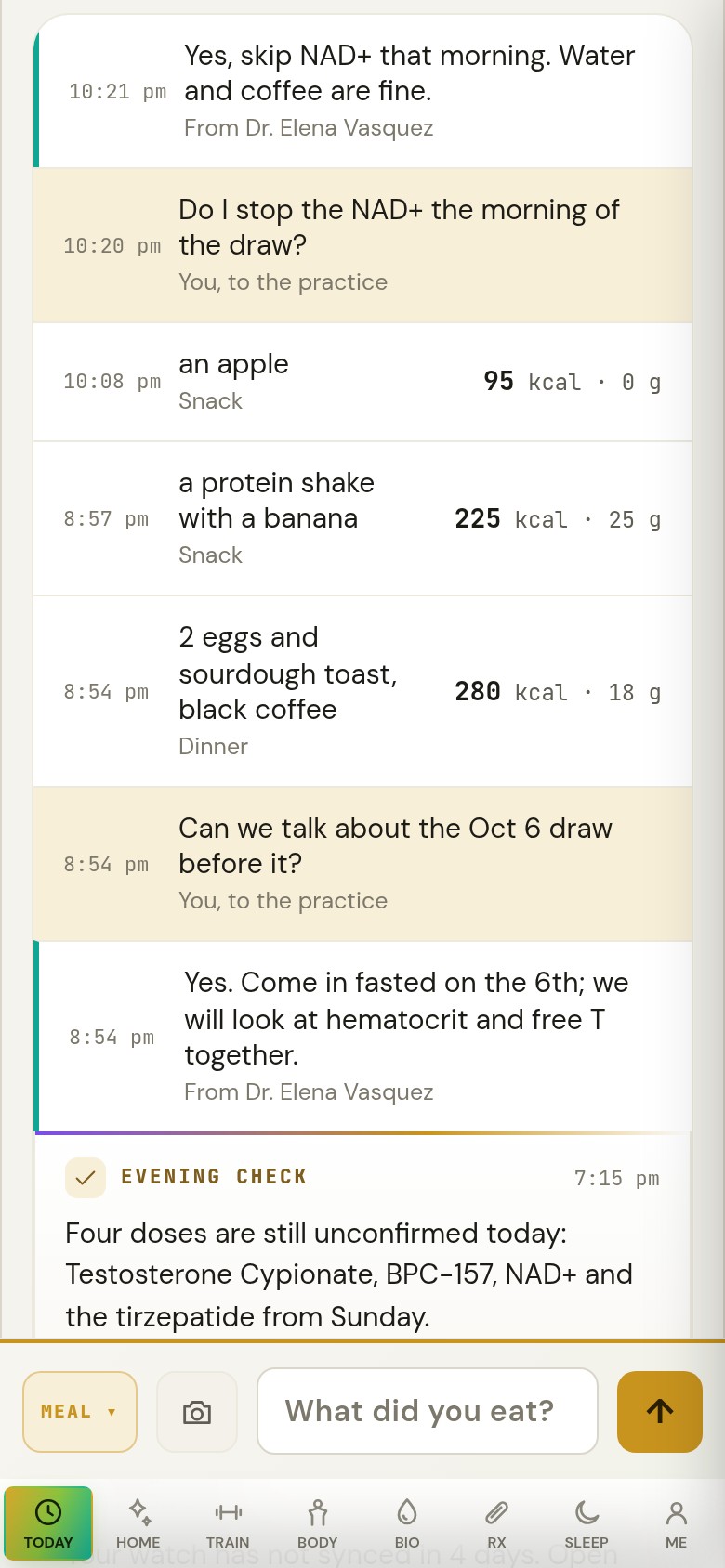
Patients can log a meal, confirm a dose, ask CHAI, or message the practice while their dashboard updates in the background.
Behind it, CHAI connects each patient’s labs, protocol, wearable data and symptoms across time, in one record that updates every morning, so you can see how lab results, protocol changes and daily patterns relate.
- LabsLab history across providers.
- DosesScheduled doses and patient confirmations.
- WearablesSleep, HRV and heart rate.
- SymptomsIn the patient's own words.
- Check-inHow the morning feels.
 Reads everything together, every morning.
- The daily briefingWhat changed, and why.
- Ask CHAIAnswers grounded in their data.
- The next requisitionWhat's missing, with pricing.
- Training and sleepInformed by labs and recovery data.
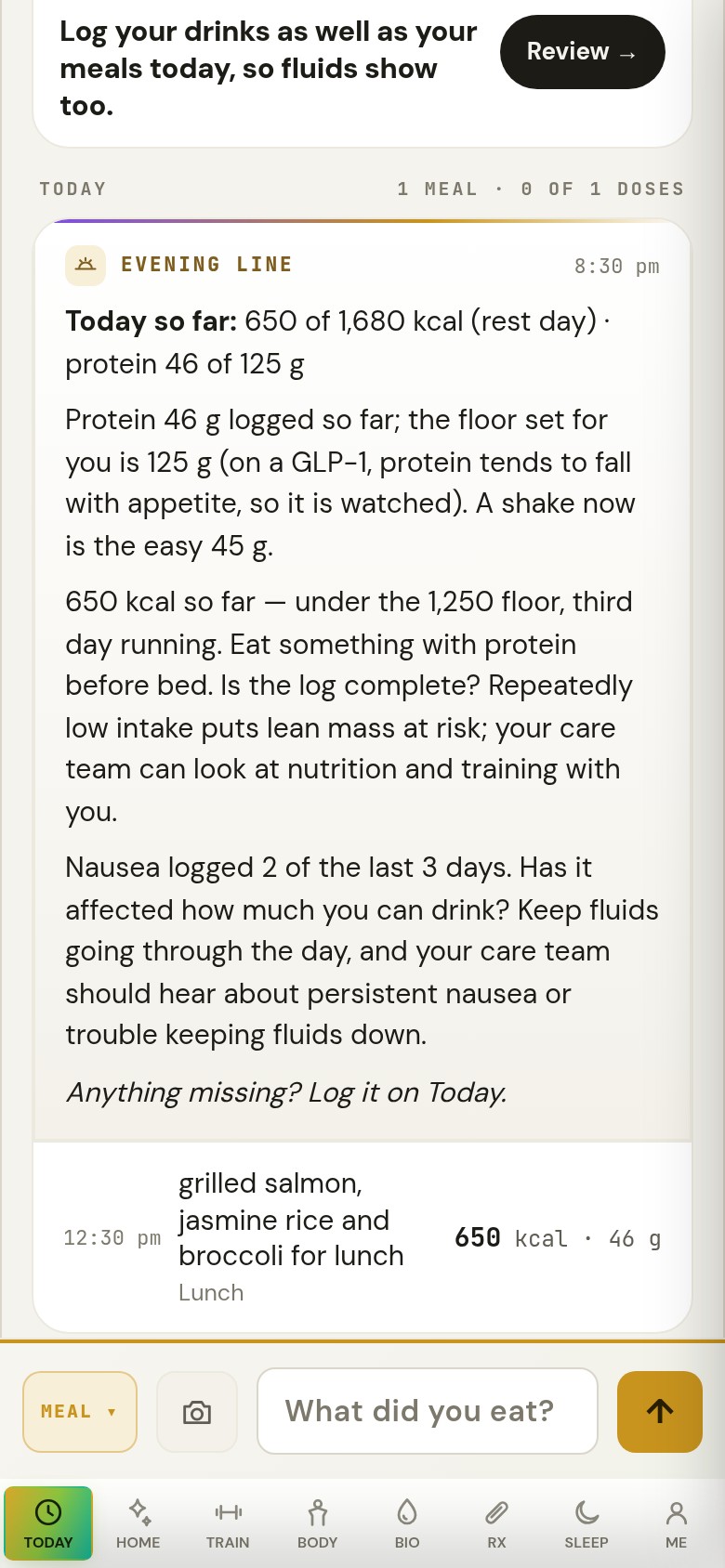
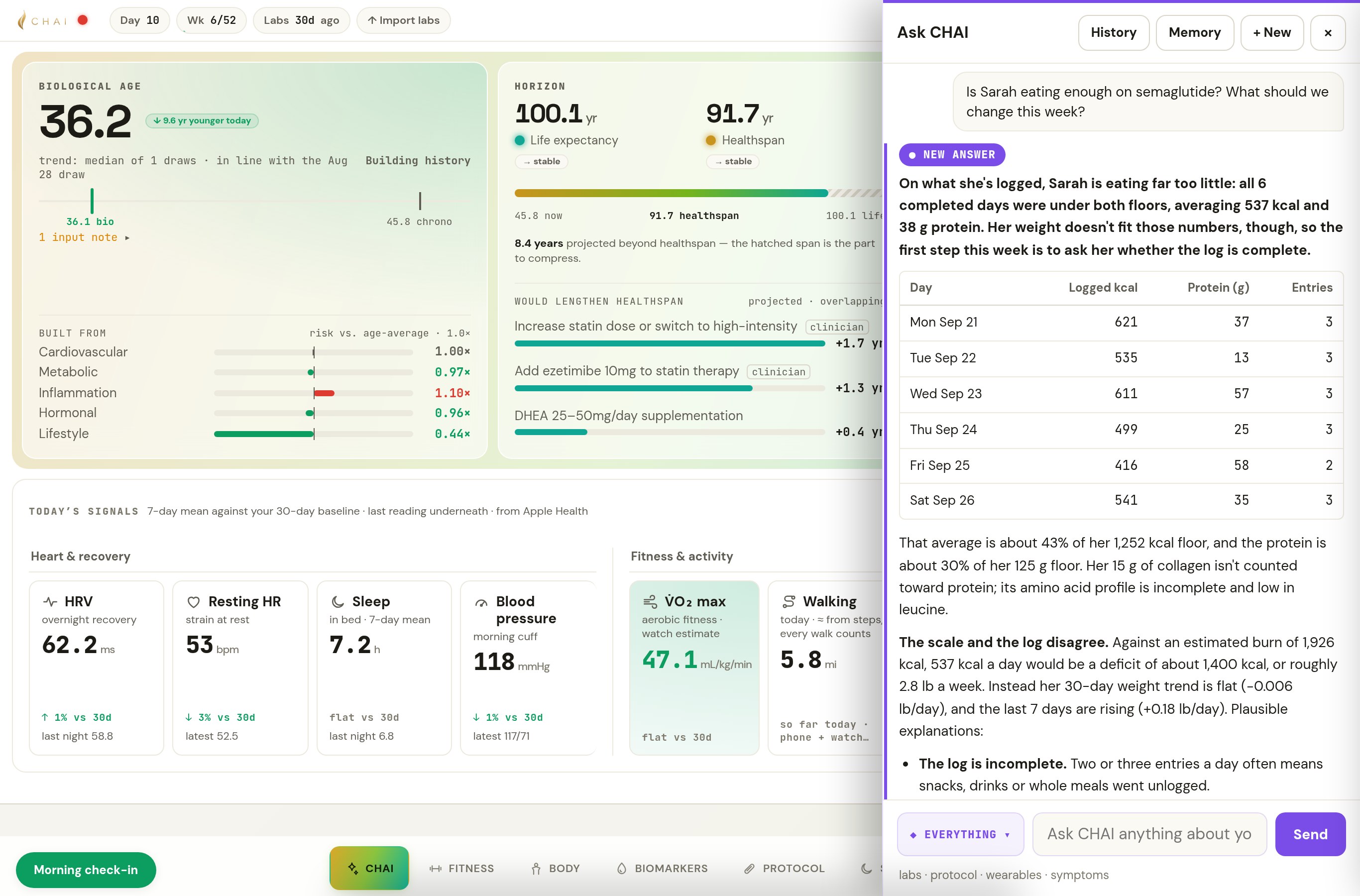
Sarah’s appetite changed. Her care team needs the full picture.
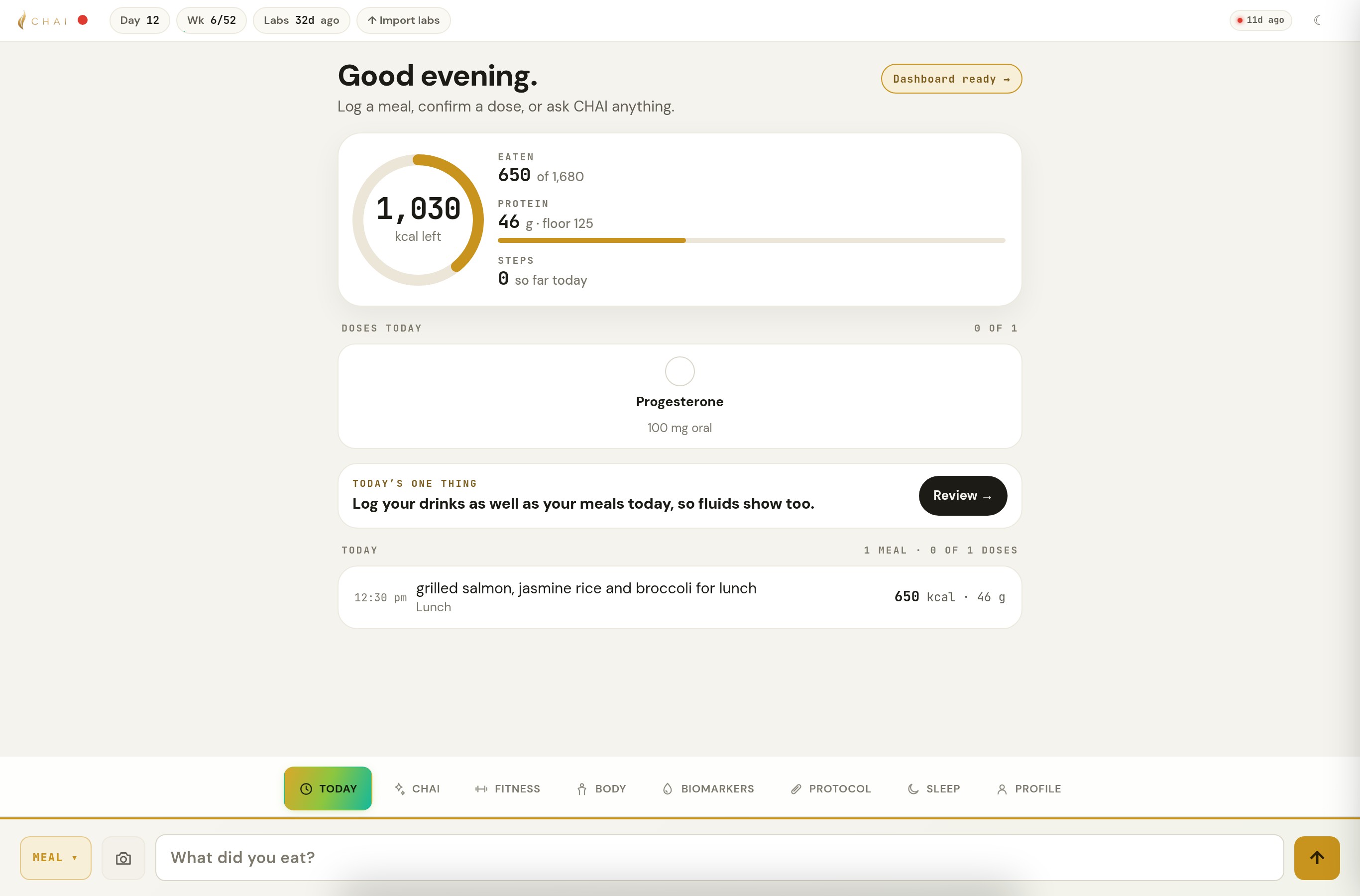
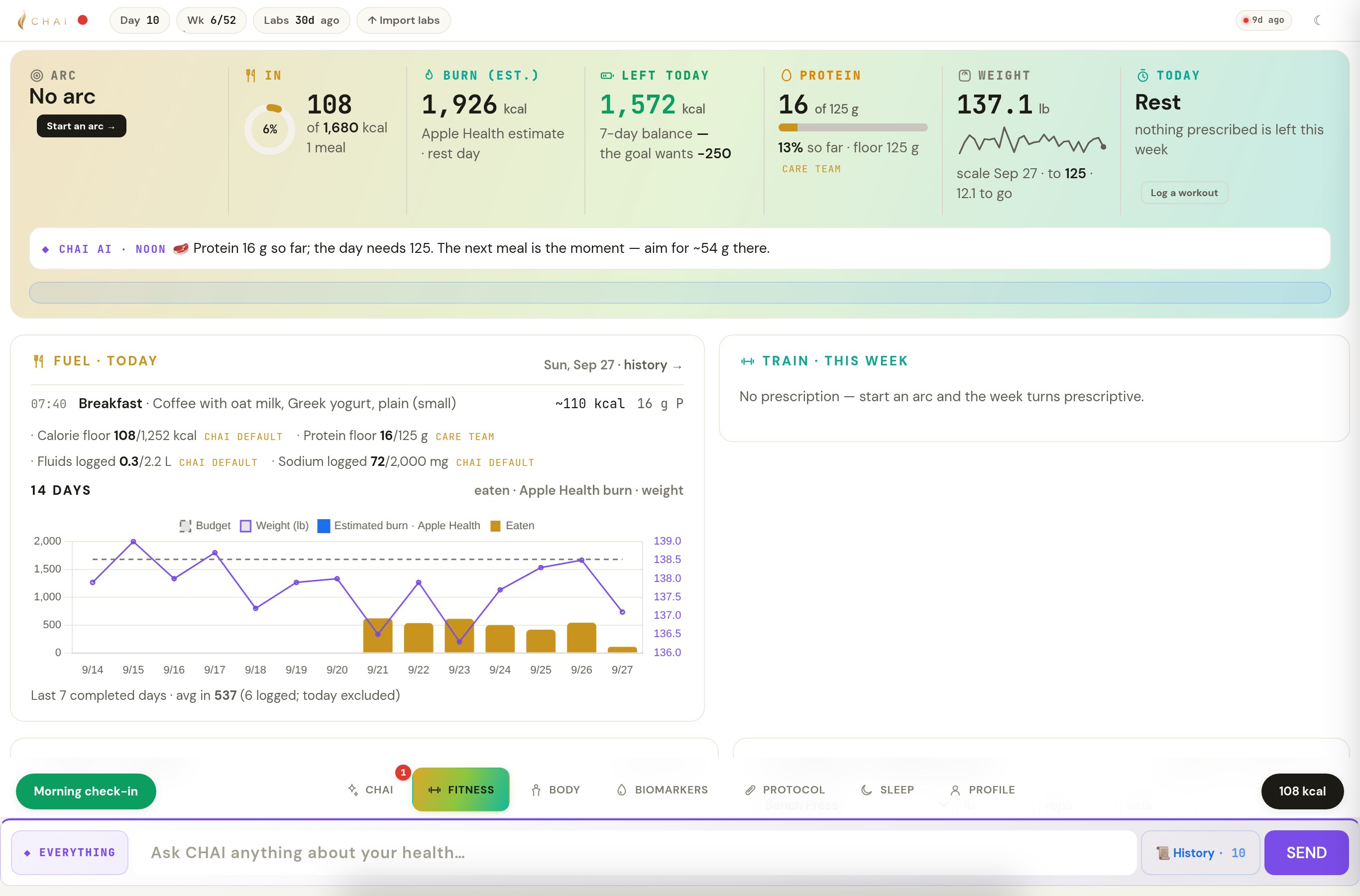
Sarah, 45, takes semaglutide and hormone therapy. She logs meals by text or photo on Today, and can correct a meal from its entry. CHAI brings her estimated intake together with her weight trend, activity and symptoms, so her care team sees what needs a closer look between visits. On a GLP-1, adequate nutrition stays in view.
Synthetic patient. Real CHAI workflow. CHAI’s own words.
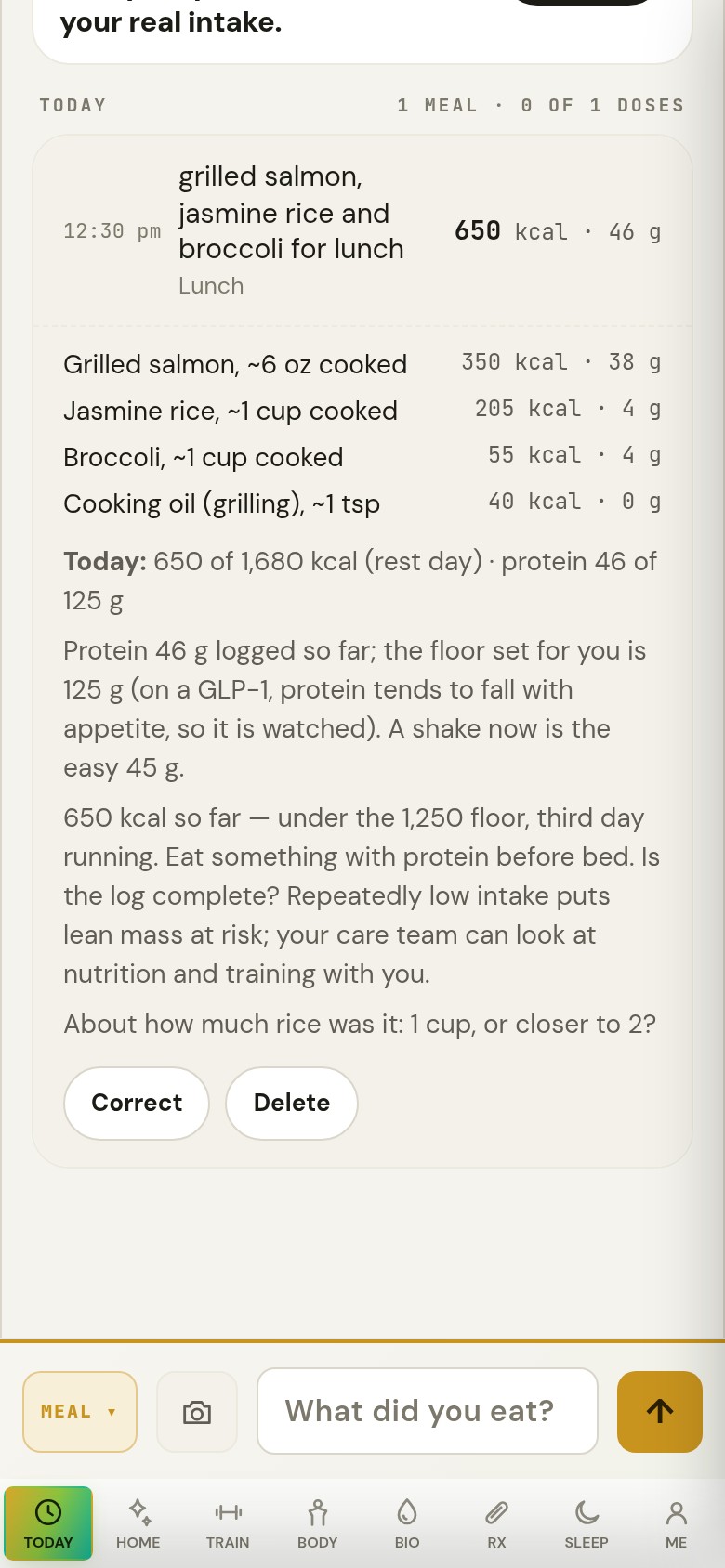
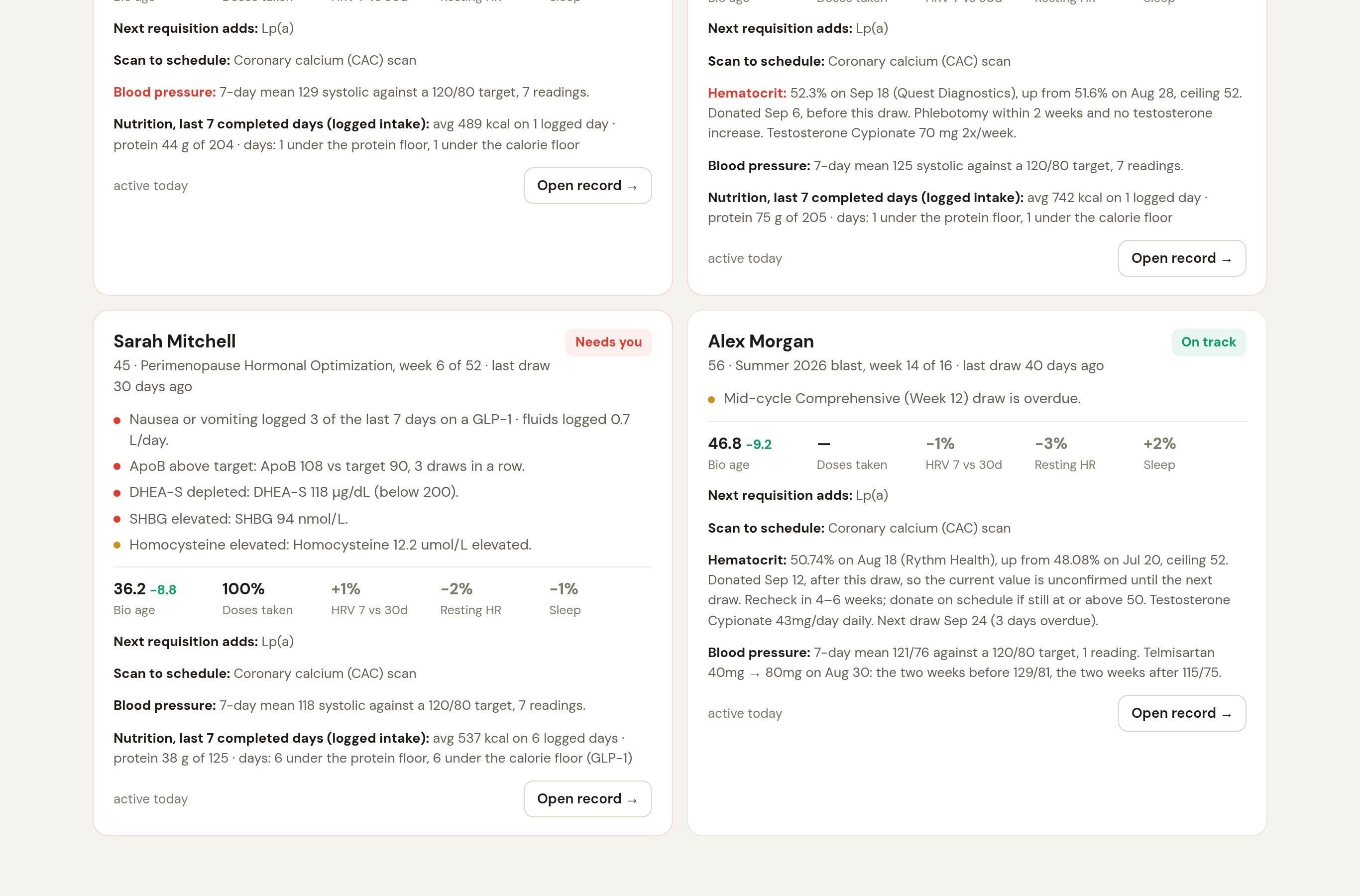
CHAI proposes. The dose stays where it is until a clinician or practice-admin account accepts a change. CHAI records which account accepted it and when. Which roles may prescribe is the practice’s own setting; CHAI checks the account role, not prescriber authority. Follow Sarah in the CHAI tour → See this workflow for your practice → Interested in CHAI for yourself? Join the interest list →
Michael, 43. No active protocol. Three consecutive lab draws show a worsening pattern.
Follow his case through CHAI—from the clinician’s dashboard to the next lab order.
Synthetic patient. Real CHAI workflow.
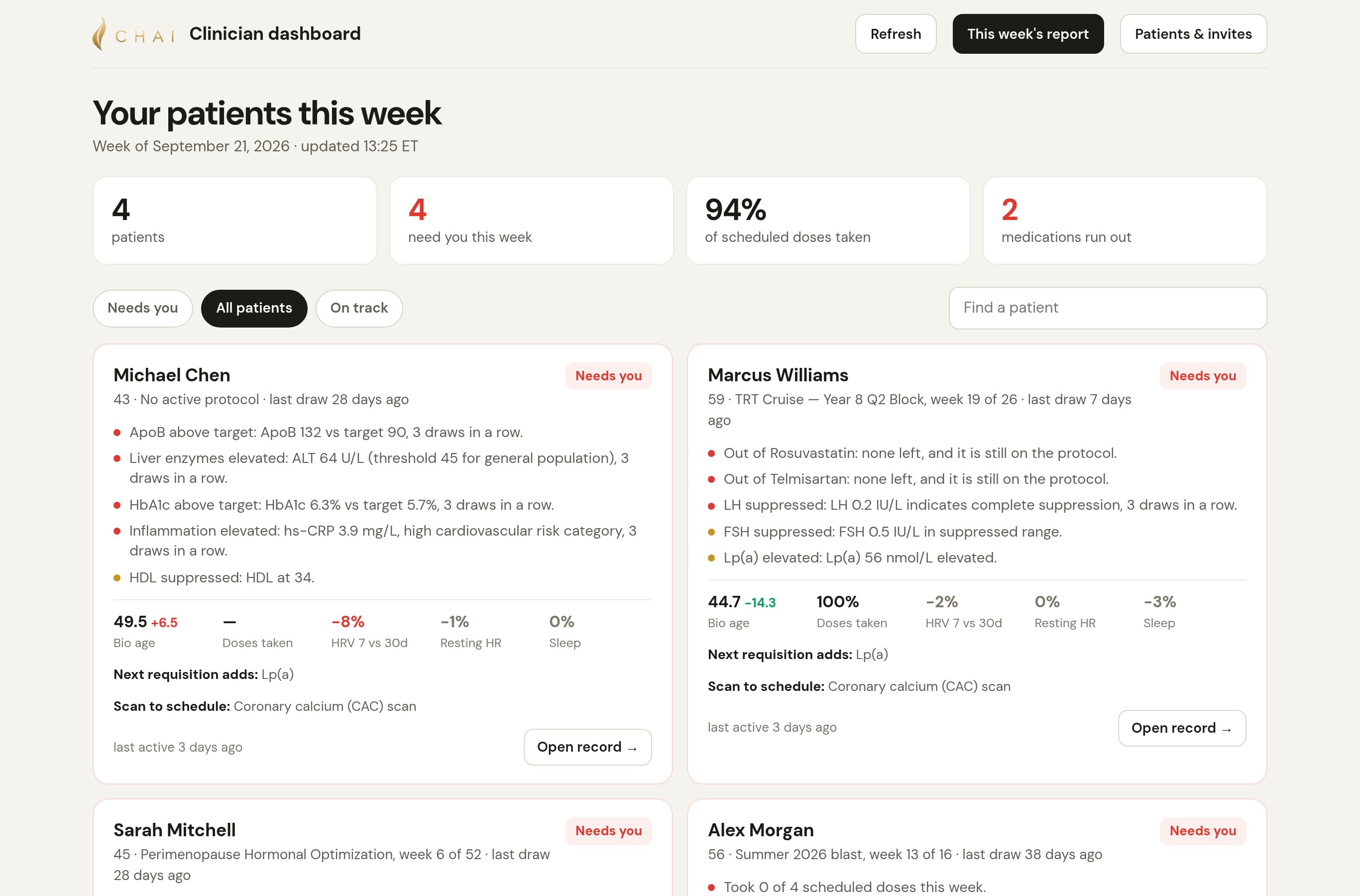
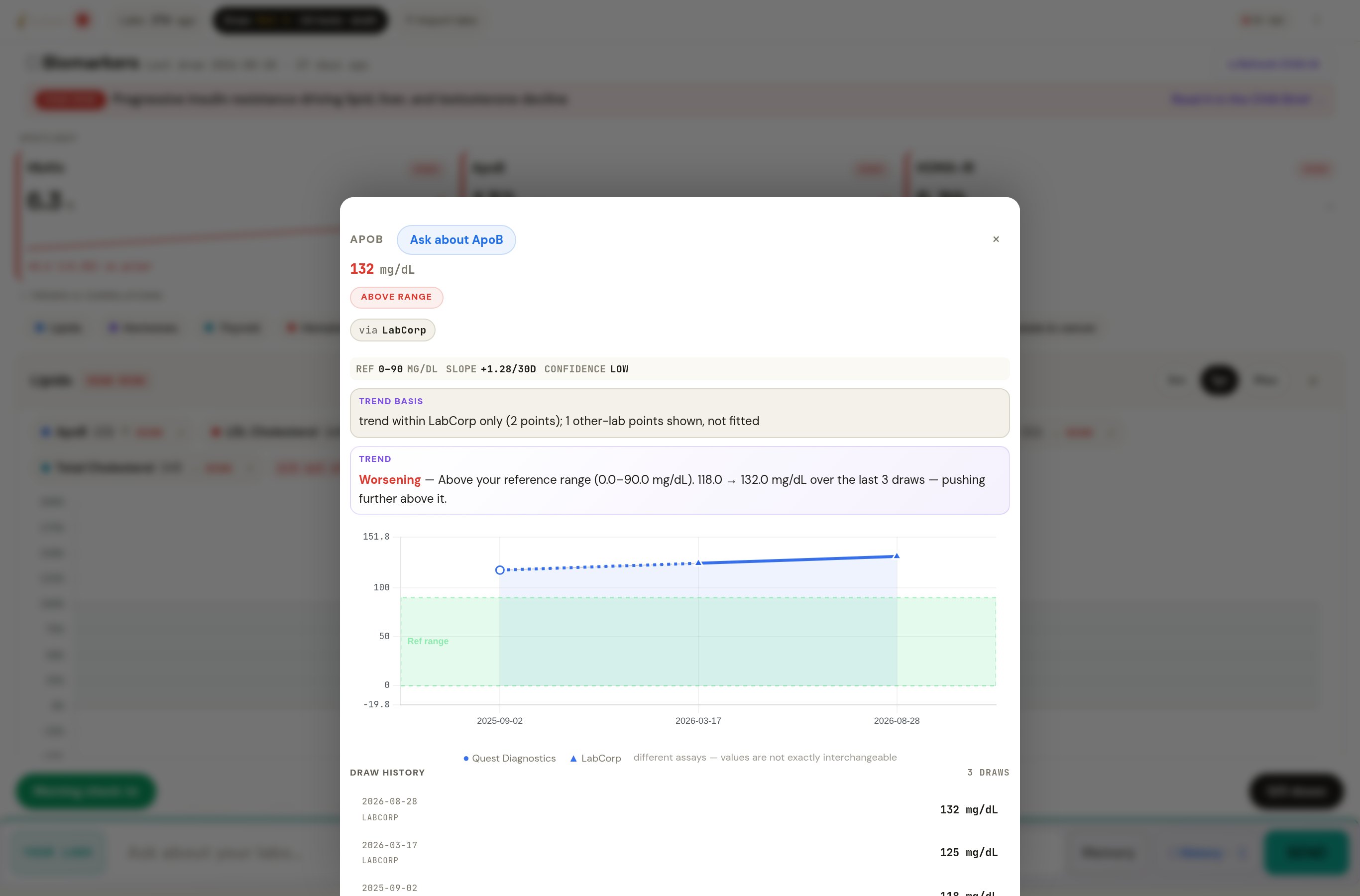
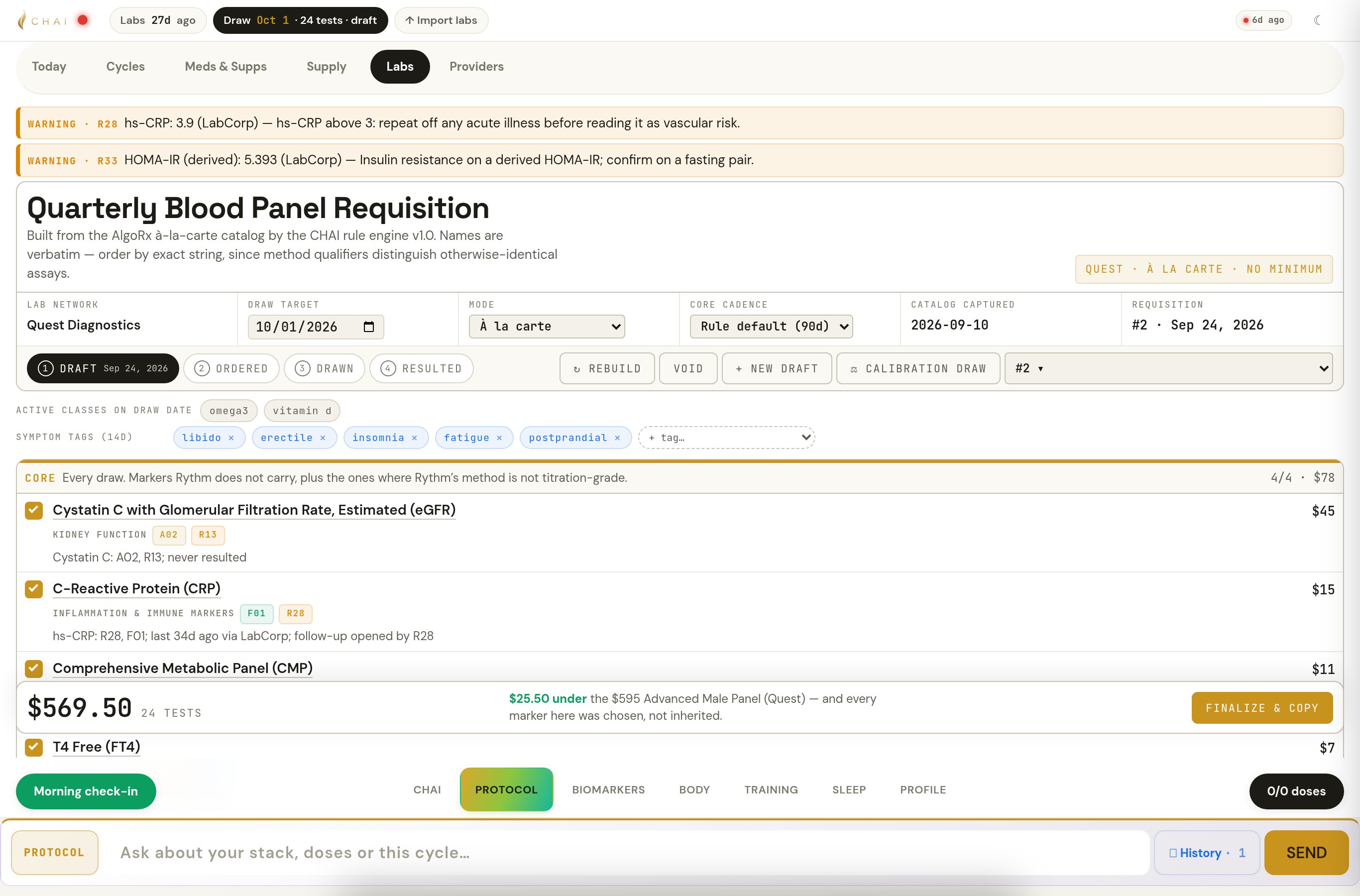
Your team reviews the next step. CHAI prepares proposed changes for review. An authorized clinician or practice administrator must accept them before they are applied. Follow Michael in the CHAI tour →
One question. The patient’s connected history.
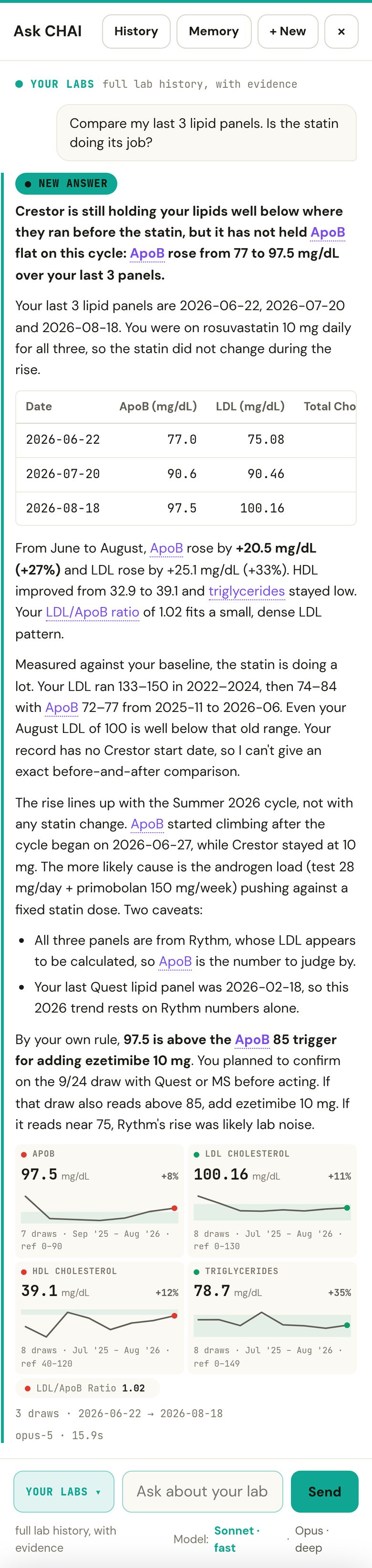
Every lab, dose, wearable reading and symptom sits in one record, so one question reaches across all of it. CHAI computes the statistics itself, shows the draws it used, and says what the data can't answer.
- Finds the markers you namein their own history, over the window you ask
- Calculates the statisticsSample size, time span, trends and correlations
- Shows the data it usedcheckable in seconds
- Lines each change up with the protocolby date, for you to judge
- Makes gaps visibleMissing results, limited samples and assay limits

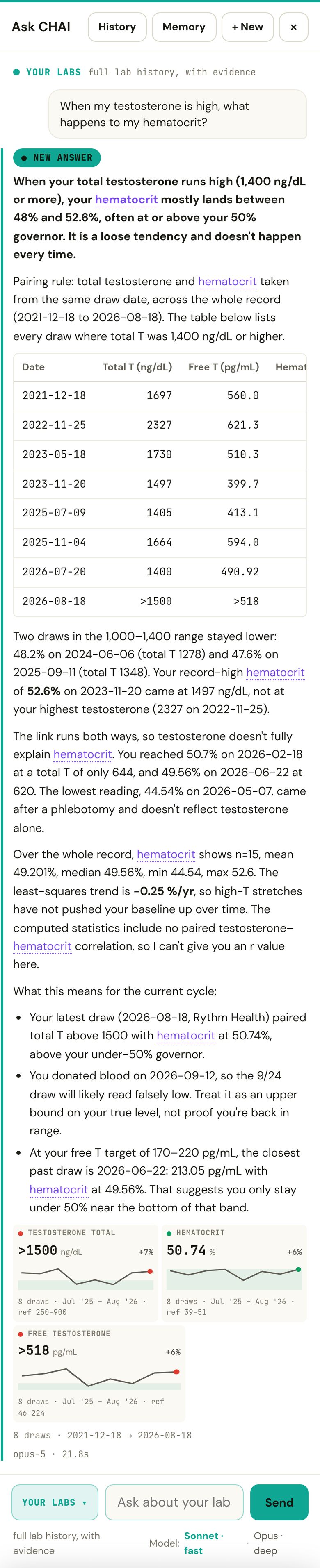
See the pattern across visits. Know which patients need a closer look.
A marker rising across three draws. An incomplete lab checkpoint. An unconfirmed dose. CHAI brings the finding and its context into view before the visit.
Calculations you can inspect.
CHAI shows the calculation, the explanation and the results behind it.
Every result keeps its lab and method.
A trend is fitted within one lab.
A clear record for each patient.
Each answer is tied to the patient it was asked about.
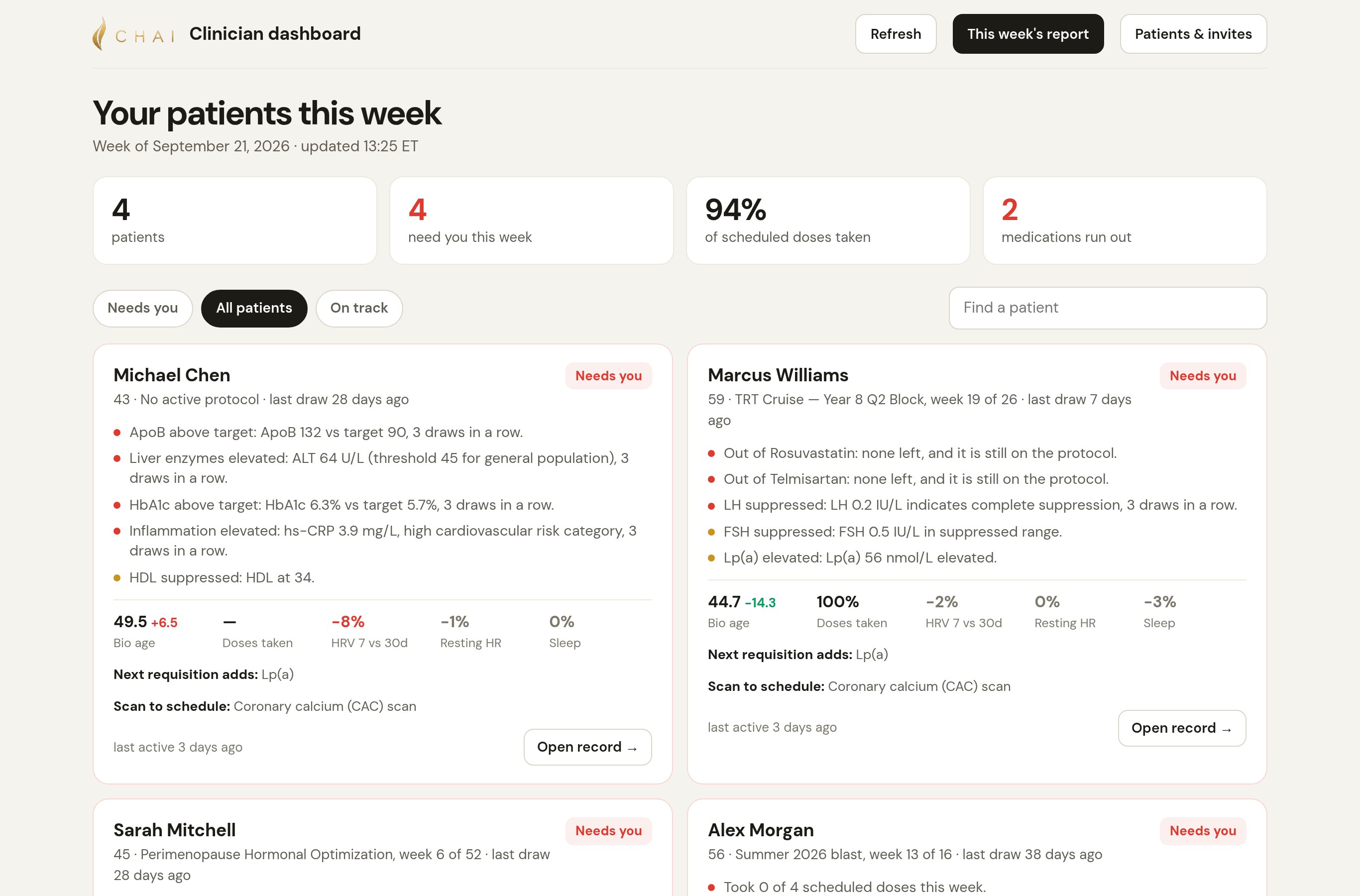
Your week’s patient priorities, in one view.
See which patients need review and the findings behind each priority. A one-page summary arrives by email every Monday.
- Who needs you, and whythe finding and the number behind it
- Doses takenagainst what was scheduled
- HRV, resting HR and sleep7 days against 30
- What the next requisition addsper patient
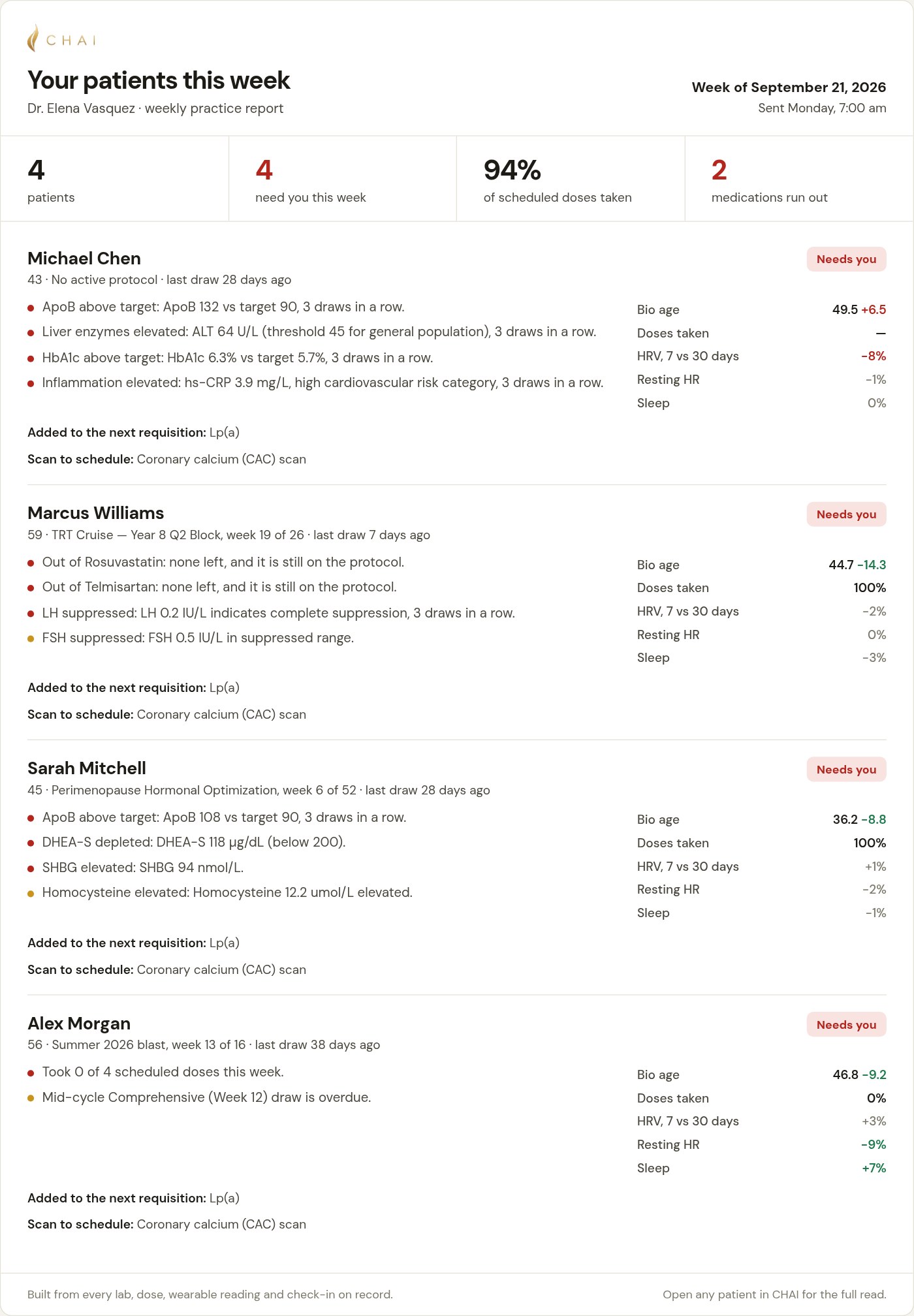 The Monday reportone page for the whole practice · open it
Keep care connected between visits.
A consistent workflow for ongoing care.
- Intakeinvite · import their lab PDFs
- Requisitionwhat to draw, why, priced
- Reviewrisk per compound · every rule checked
- Amenddose changes proposed · clinician or admin accepts
- Reportprintable: protocol, labs, reads
See CHAI in action in 30 minutes.
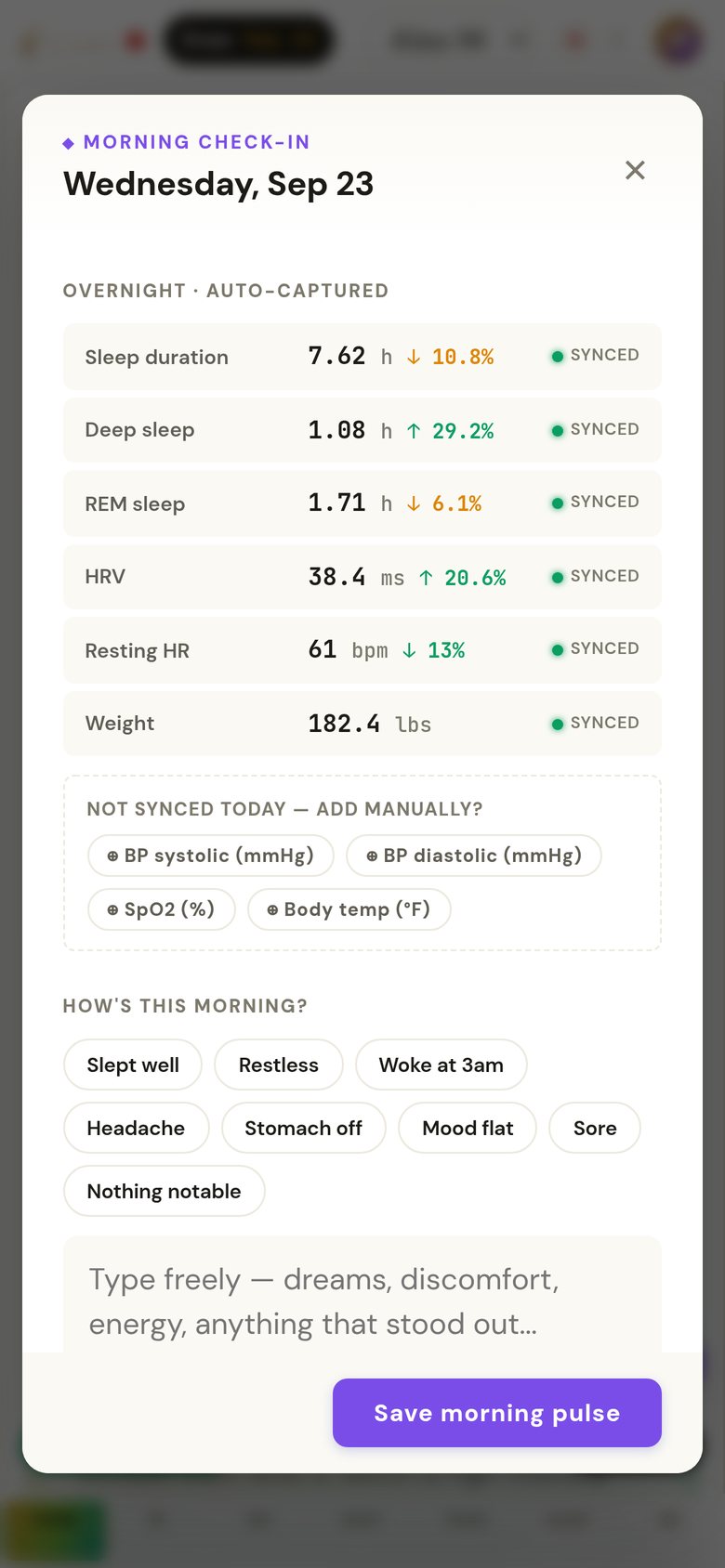
Your practice, in their pocket. Every morning.
Give patients a daily briefing, a simple check-in and follow-up that reflects their care plan.
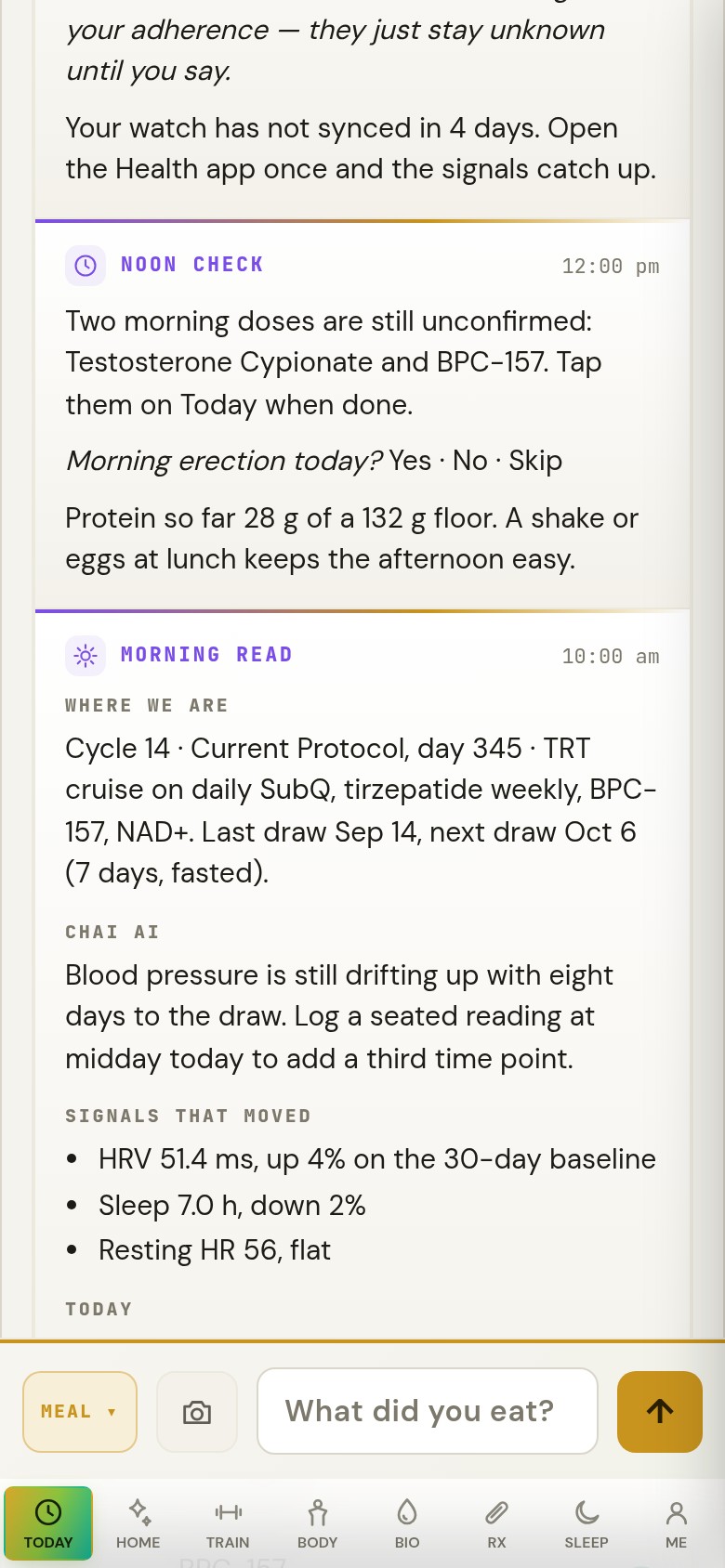
What synced, what didn't, and how the morning feels.
- Captured overnightsleep, HRV, heart rate, weight, from Apple Health
- Only what didn't sync is askedblood pressure, SpO₂, temperature
- How's this morning?one tap, or a sentence
- A quick signal, if they wantthe questions follow the patient
- Skip it and CHAI follows uponce, on Today
It asks, backs off, and stays quiet when there's nothing to say.
Are you a patient? Bring CHAI to your clinic →
Connected intelligence for the care you provide.
In the patient's pocket.




We set up your practice. And every patient in it.
Hands-on onboarding for your practice and patients. Our team handles setup and guides each patient, or trains your staff to do it.
- Practice setupWe set up and run your practice’s own CHAI server. You tell us which patients start first.
- Patient introductionEach patient receives a personal login and guided setup from our team or your trained staff.
- Records and protocolWe import their lab PDFs and current protocol, and check each result arrives with its lab and date.
- Their iPhoneWe guide patients through CHAI, secure access and Apple Health sharing on their iPhone. Daily messages arrive in the app.
- The first morning readOnce their data syncs: what changed, the one thing to do today, and the morning check-in.
- Support that staysWe support patients and staff by email. Clinical questions stay with your clinicians.
Patients need an iPhone with Apple Health; Android isn’t supported yet. The CHAI app is free and will be distributed through the App Store. CHAI runs alongside your EHR, not instead of it.
Private by design. Built to the HIPAA Security Rule.
Approvals: CHAI proposes dose and protocol changes. Only a clinician or practice-admin account can accept one, nothing is applied until they do, and each acceptance is logged with who and when. A signed clinician review record is in development. How CHAI handles data →
Questions practices ask.
Is CHAI available now?
Practice demonstrations are available now. CHAI runs daily on its founder’s record, and we’re preparing our first practice deployments.
Does it replace our EHR?
No. CHAI runs alongside it and holds the longitudinal record: labs, protocol, wearables and symptoms. There's no direct EHR connection yet; CHAI's patient reports print for the chart.
What gets imported, and how?
Lab results arrive as PDFs from any lab, and each result keeps its lab and method. Wearable data comes through Apple Health. Doses are confirmed by the patient on Today. Quest ordering codes are built into the requisition; reading Quest's own result files directly is in development.
Which devices do patients need?
An iPhone with Apple Health, the free CHAI app (to be distributed through the App Store) and a private-network app we set up with them. Apple Watch works directly, and Oura and Whoop work through Apple Health. Android isn’t supported yet. CHAI also runs in a browser on a desktop or iPad.
Where do CHAI's messages arrive?
On Today, inside the CHAI app.
Can patients message our practice?
Patients can send a message from Today. Your team replies from the clinic page's Inbox, and the reply appears in the patient's conversation.
Who does the setup, and how long does it take?
We set up your practice’s server, import patient records and train your team. Patients receive guided onboarding from us or your trained staff. We’ll agree on a rollout schedule based on your starting group.
What happens with a critical value?
CHAI has hard safety rules for critical values, such as systolic blood pressure of 180 or higher, a resting heart rate of 120 or higher, severe kidney impairment, and hematocrit of 54% or higher. They override everything else it says. CHAI isn't an emergency service: urgent findings follow your practice's own process.
Who approves changes?
CHAI proposes dose and protocol changes, with the calculation behind each one. Only a clinician or practice-admin account can accept one; nothing is applied until they do, and each acceptance is logged with who accepted it and when. A signed clinician review record is in development.
How is it priced?
Pricing is based on the number of patients using CHAI in your practice. We’ll outline pricing for your planned rollout during the demo.

I've managed my own health for most of my life. No one ever had the whole picture, so I built something that does.
— Barry Katzman, founder of CHAI
CHAI reads my whole record every morning, finds the trends and the correlations, and tells me what to do next, with the data behind it. Anything that needs my clinician goes to my clinician, and my clinician sees all of it.
Request a practice demo.
In 30 minutes, follow a patient from the first flagged trend to the next lab order, explore Ask CHAI, and discuss a rollout for your practice.
Share a few details. We’ll email you to arrange your demo.